
Ninja Forms Advanced Datepicker Addon v3.3.5
Let your users book dates and times for appointments and more directly from any WordPress form!
Same brand
More from Ninja Forms
Ninja Forms Webhooks Addon
by Kevin Stover
Send submission data collected by Ninja Forms to an external API/URL.
Ninja Forms Paypal Checkout Addon
by Quay Morgan
Use PayPal Checkout to accept standard PayPal payments, PayPal credit, Pay Later, Venmo, & bank debit in WordPress!
Ninja Forms Insightly CRM Addon
by James Laws
Building deeper customer relationships means your business grows faster.
Related items
Related Ninja Forms Plugins
Ninja Forms Layout & Styles
by Premium Plugins
Easily create multi-column form layouts and beautifully styled form elements without mastering CSS.
Ninja Forms Zapier Addon
by James Laws
Integrates Ninja Forms with Zapier.
Ninja Forms Front End Posting Post Creation Addon
by James Laws
Create posts, pages, or any custom post type from the front-end.
Let your users book dates and times for appointments and more directly from any WordPress form!
Do you need a simple, hassle-free way to let your users schedule dates and times with you or your business? You can now set up scheduling and appointment form options directly from any of your WordPress forms with the Advanced Datepicker add-on!
You may have already tried, or even currently are using, any one of the many scheduling and booking plugins for WordPress. Lots of them out there, and many of them really good. They can also be complicated to setup and maintain for you and our clients. Especially if you have to connect to third party services to get the job done.
There’s now a very easy way to handle appointment forms directly from any form on your site. And the best part is, you have all the tools you need to very easily build complex appointment forms right at your fingertips.
Use your forms to schedule consulting appointments, events, rentals, and more!
What options for appointment forms does the Advanced Datepicker give me?
The Advanced Datepicker add-on brings a host of additional options to the Ninja Forms Date/Time field!
Manually enable or disable dates that a user can select.
With an easy to use calendar view, simply select the dates you want users to be able to select (or not select!):
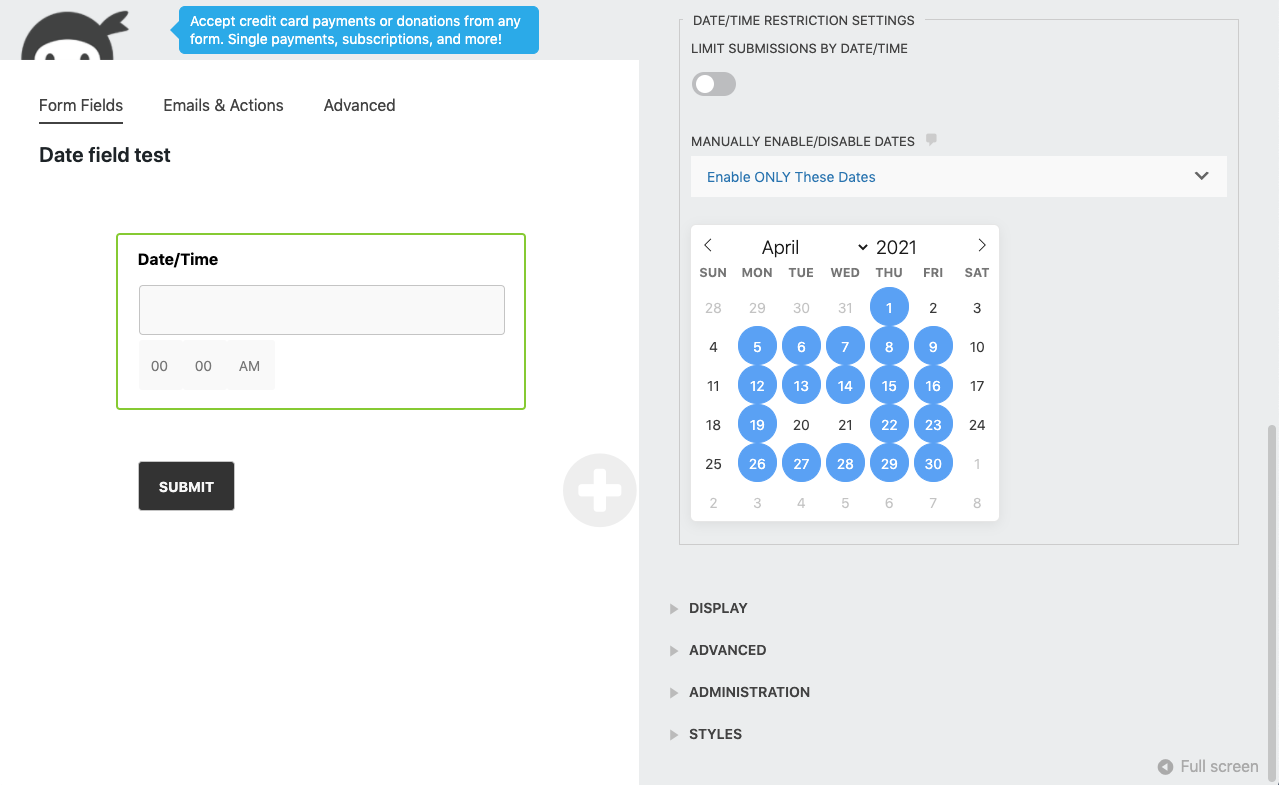
Easily configure days you are available, or if it’s easier, days you’re not!
**At this time, users of the form can only select a single day from the Date/Time field. Selectable date ranges are a possibility to be added in the future. Let us know if you’d like to see this feature soon!
Show full descriptionShow less
Limit the times of day that can be selected, and set time intervals.
Set the time of day you’re available and even the increment of time to be blocked off when the user schedules!

**At this time, users of the form can only select a single time from the Date/Time field. Selectable time ranges are a possibility to be added in the future. Let us know if you’d like to see this feature soon!
Limit the number of submissions by date and time
Want an entire day or span of days to only be selected once? Twice? Ten times? No problem.
Need to have 30 minute availabilities open all day, but any one 30 minute slot to only be booked by one person? Easy.
Just toggle on submission limits by date and time, then tell the Advanced Datepicker how many submissions are allowed.
Apply Conditional Logic to date and time selection
Combined with the Conditional Logic add-on for Ninja Forms, the Advanced Datepicker opens up even more scheduling options!
Need to present users different options based on the date or time selected? Show or hide entire steps of the form? Charge different prices for different dates or times? Just apply the logic you need to make almost anything happen!
Get automatic notifications of each new appointment
Ninja Forms notifications work flawlessly paired up with the Advanced Datepicker features. Count on on email notifying you or your client of each new booking. Even get sms, Slack, or Trello notices if you prefer!
Need different notifications going out to different people depending on the date or times selected? Again with Conditional Logic, no problem.
Start making professional scheduling and appointment forms easy with the Advanced Datepicker for Ninja Forms!
Never wonder if your booking form will give you the options you need again. Stop dealing with the hassle of connecting to, and checking in with, third party scheduling services. Start handling all your booking, appointments, scheduling, and more with the Advanced Datepicker for Ninja Forms!
Recent releases
Release history
- Fixes:*
- free a booked date when its submission is trashed or deleted
- support minute increments of 60 or more, such as 90-minute appointment slots
- Enhancements:*
- warn on the submissions screen when a date has more submissions than its limit allows
- settings to customize the unavailable date, fully booked, and unavailable time error messages (developer mode)
View changelog
- Fixes:*
- date format validation for d/m/Y (day/month/year) format
- default AM/PM value to respect hour limits
- weekday restrictions not working when no specific dates selected
- hour dropdown resetting when changing minutes with limited hours
- time-only field validation with hour limits
View changelog
- Fixes:*
- version comparison for min/max date settings
Frequently asked questions
Is Ninja Forms - Advanced Datepicker GPL licensed?
What is the latest version of Ninja Forms - Advanced Datepicker?
How much does Ninja Forms - Advanced Datepicker cost on GPLCoffee?
Which WordPress versions does Ninja Forms - Advanced Datepicker support?
Is Ninja Forms - Advanced Datepicker safe to download?
Auto-updates included
Install it once, update automatically.
The GPLC Connector installs this plugin from your wp-admin and rolls out new versions to your connected sites. Included with every membership plan: 10 to 40 connected sites depending on the plan (Lite 10, Pro 20, Geek and Lifetime 40).