GPLCoffee
Get Started

Update premium plugins across your sites.

Approve updates for all your connected sites at once. If one breaks a site, the Connector restores the previous version.
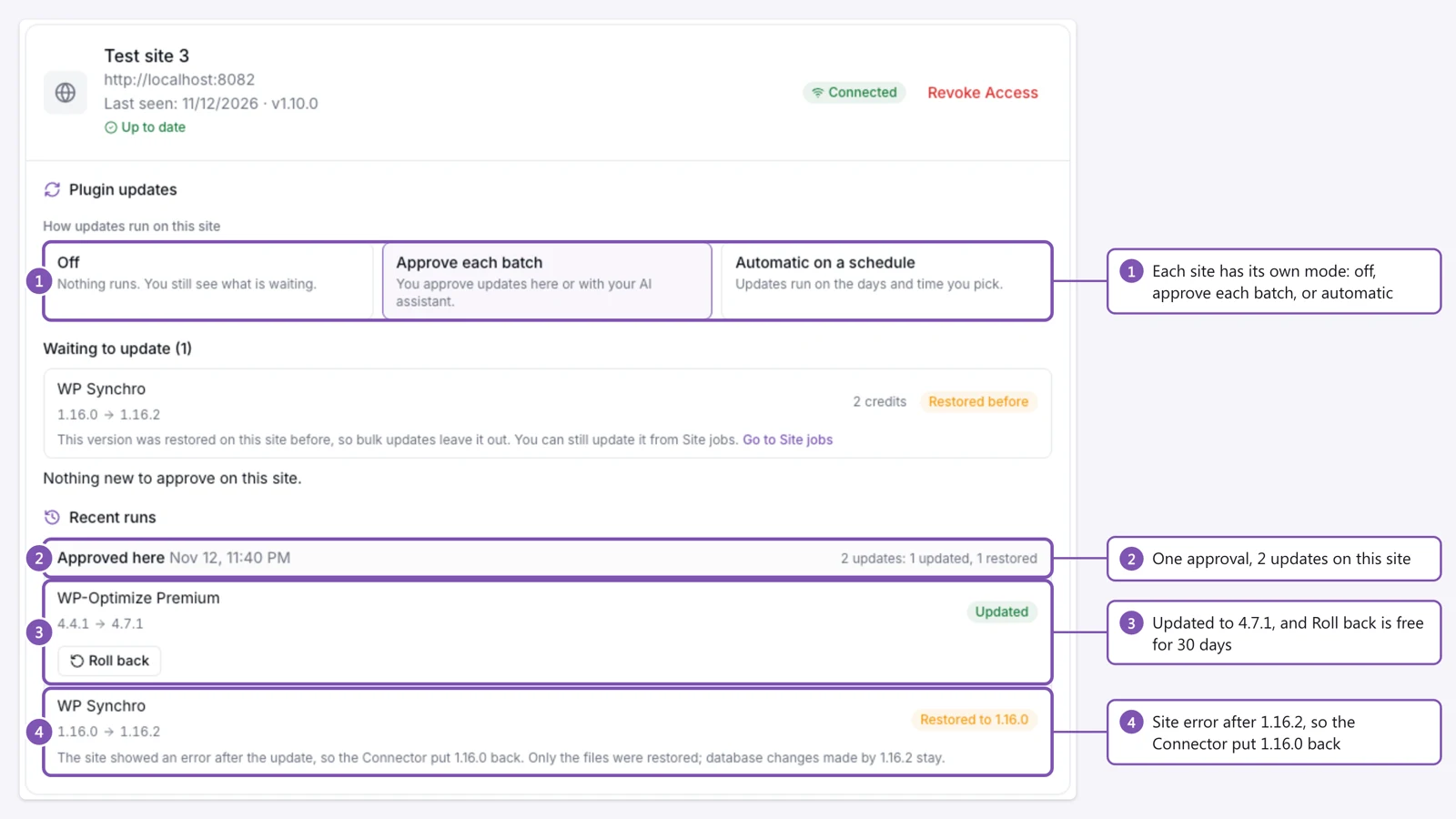
One site on the Sites page of gplcoffee.dev after a bulk run, with four numbered notes: each site has its own update mode, one approval ran 2 updates on this site, WP-Optimize Premium was updated to 4.7.1 with a Roll back button, and WP Synchro was restored to 1.16.0 after a site error.
One site after a bulk run: one plugin updated to 4.7.1, one restored to 1.16.0 after a site error.

Connect your first site in three steps.

  1. Step 1

    Install the Connector

    Add the GPLC Connector in wp-admin, like any other plugin.

  2. Step 2

    Connect the site

    Paste the licence key from your account. Your plan covers 20 to 40 connected sites.

  3. Step 3

    Turn on updates

    Approve each batch yourself, or let the site update on a schedule.

Approve updates across your sites at once.

Your sites page lists the plugin and theme updates waiting on each connected site. Approve them together, or let a site update itself on the weekdays and hour you pick. Approved updates start within about 5 minutes.

How bulk updates work

The Sites page of gplcoffee.dev before a bulk run, with two numbered notes: 8 updates waiting on 3 sites for 15 credits in total, and one approval for all 3 sites that runs within about 5 minutes.
Before a run: 8 updates on 3 sites, approved once.

A failed update undoes itself.

The Connector saves the version you run, updates, then loads your home page. If the site returns an error, it restores the previous version. You can also roll back any update for 30 days.

How rollback works
  1. 1

    Save a snapshot

    The version you run now, stored off-site

  2. 2

    Update

    The new version replaces the files

  3. 3

    Check the site

    The Connector loads your home page

  4. 4

    Roll back on an error

    The previous version is restored

Ask your AI assistant to queue updates.

Claude, ChatGPT or Cursor lists the updates waiting on each site, with the credits each one costs. It queues the ones you pick, and nothing runs until you say yes.

Connect your AI assistant
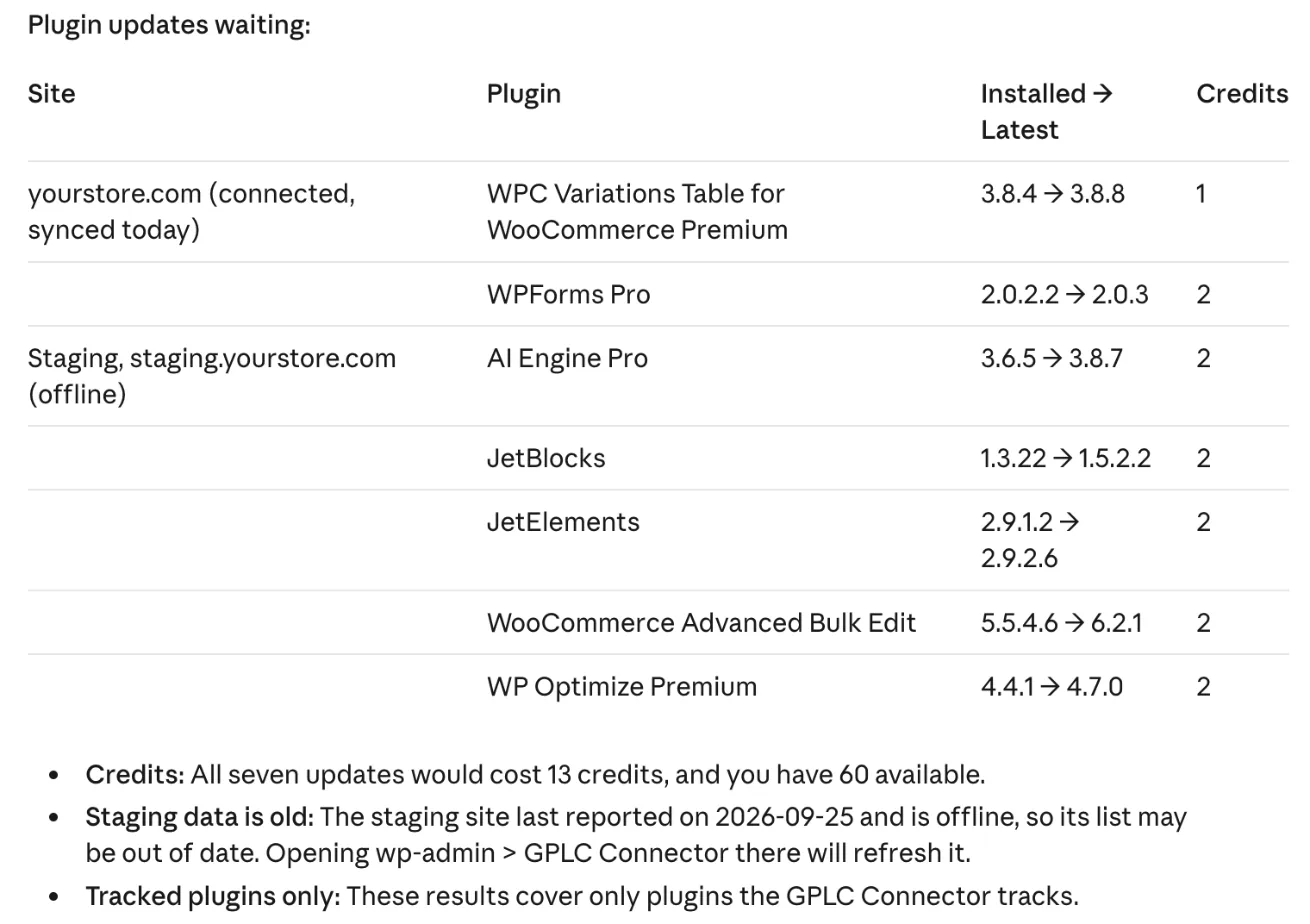
Claude's table of plugin updates waiting on two connected sites, with installed and latest versions and the credits each update costs.
Claude listing the updates waiting on 2 connected sites.

The catalog

Every membership includes the catalog.

7,756 plugins, themes, and PHP scripts, updated daily.

Press Shift+Delete to remove.

Pricing

One membership, three ways to pay.

Every option includes the catalog, the Connector and updates with rollback.

Full pricing

GPLCoffee Membership

$19.90/ month
  • Your AI assistant can queue updates and downloads
  • Update emails for up to 50 items
  • Priority email support
  • Cancel anytime
Choose GPLCoffee Membership

GPLCoffee Membership

$119.90/ year
  • Your AI assistant can queue updates and downloads
  • Update emails for up to 50 items
  • Priority email support
  • Cancel anytime
Choose GPLCoffee Membership
Best Deal

Lifetime

$299.90 one-time
  • GPLC Connector bundled forever: 40 sites
  • AI assistant: site jobs and download links
  • Stack add-ons for more Connector sites
  • 300 favorited items & Quick download
Choose Lifetime

Five questions before you join.

What happens when an update breaks my site?
The Connector restores the version you ran before. It saves that version off-site before replacing any files, then loads your home page, and an error there triggers the restore. You can also roll back an update yourself for 30 days, at no credit cost.
Which plans install themes through the Connector?
Pro plans and above, which includes the membership on sale today. The Connector installs and updates themes and never activates one, so a newly installed theme does not replace the one your visitors see.
Is it legal to use these files?
The WordPress plugins and themes in the catalog are GPL-licensed, which lets them be redistributed and used on any number of your sites. GPLCoffee is independent and is not affiliated with the original developers. PHP scripts carry their own licences, so we make no GPL claim for them.
Does the Connector install PHP scripts?
No. The Connector installs and updates WordPress plugins and themes. PHP scripts are part of the catalog and download from their product page in your browser.
How do billing and cancelling work?
You pay through PayPal, with a PayPal account or a card, and you can cancel at any time from your account. The pricing page lists what each billing period costs and what it includes.