
Learndash Dashboard v6.4.1 - WordPress Plugin
Sale 20% Off Learndash Dashboard With Frontend Course Builder LearnDash Dashboard is a complete and user-friendly eLearning solution for instructors and students.
Same brand
More from Wbcom Designs
BuddyPress Friends And Follow Suggestion
by Wbcom Designs
BuddyPress Friends and Follow suggestions plugin assists you with improving your BuddyPress or BuddyBoss Platform-based community website by providing profile matching features to your members.
BuddyPress Newsfeed - WordPress Plugin
by Wbcom Designs
Create A Customized Newsfeed Experience Just Like Facebook.
Woo Sell Services - Sell Services With WooCommerce
by Wbcom Designs
Woo Sell Services assists you in running your freelance or service marketplace business easily.

Related items
Related Learndash Plugins
Design Upgrade Pro For Learndash
by Escape Creative
Better LearnDash styles.
Learndash Uncanny Pro - WordPress Plugin
by Ryan Moore
LearnDash extension providing time tracking, autocompletion, transcripts, group registration, and advanced course management tools.
Learndash WooCommerce Integration
by LearnDash
About WooCommerce is the most popular shopping cart software for WordPress.
Sale 20% Off Learndash Dashboard With Frontend Course Builder LearnDash Dashboard is a complete and user-friendly eLearning solution for instructors and students. It includes a frontend course builder, dedicated dashboards, detailed reports, quiz tracking, assignment management, Zoom integration, advanced analytics, and instructor showcasing. Change Log → Version v7.4.0 → Released: 3rd July 2025 Buy Now Try Demo Documents 
 The #1 Choice for a LearnDash-Powered Course Marketplace!
LearnDash, the most trusted LMS plugin is best for your course marketplace. Recommended hosting options are Liquid Web, LearnDash Cloud, Cloudways, and Kinsta. The easy-to-use LearnDash Dashboard works perfectly with the LearnDash WordPress theme. Recommended theme options include LearnMate, Kandence, and Astra.  Frontend Course Builder for Instructors Learndash Dashboard’s Frontend Course Builder lets instructors create and manage courses directly from the front-end, without accessing the complex WordPress backend.
It makes course creation easier by allowing instructors to assign quizzes and certificates. Manage Lessons, Quizzes, and assignments. Once the courses are created, you can create lessons, topics, quizzes, and assign corresponding certificates. Course attributes. The frontend dashboard provides all Learndash's backend attributes, with accompanying tooltips for guidance.
Dedicated Dashboard for Instructor, Groups Leader and Student. Website administrators, instructors, group leaders, and students each have a personalized dashboard to track progress, including completed courses, number of enrollments, total students, earnings, and more. There are easy-to-read tiles that display learning statistics. Instructors can see a graph of their earnings and how many courses they've sold.
You can also check out graphs that show how far students have progressed in individual courses. Plus, there's an interactive pie chart to see how much time is spent on courses. A Graph is there that shows the most popular courses based on how many users have enrolled in them Additionally, you'll find a student details section that presents information about students, including their course progress.
Show full descriptionShow less
It also features interactive graphs showing data related to courses, assignments, and quizzes. 
 Reporting widgets & Detailed report with Export feature Website admins, instructors, and group leaders can view detailed reports of student progress, including course completion times, assignment and essay grades, and other metrics. This information helps instructors track student performance and make informed decisions to improve courses. Essay Report Assignment Report Quiz Report Quiz Attempts Submitted Essays Course Reports Buy Now Course Report This report has information like the progress of a course, how much time students spend on it, the average time to complete it, and the number of students who finished it.
You can also see this information for each student separately. Report Filter These report filters lets you filter out the data based the specific course students or groups making it easier to focus on the data that’s important for your needs and ignore the rest. It’s an important feature that helps you tailor your data according to your specific needs.
Exported CSV You can take all the information from the reports (Essay Report, Assignment Report, and Course Report) and download it in CSV format . It will be an easy way to save and work with the report information on your computer. Course Management for Instructor These report filters let you filter out the data based on the specific course students or groups, making it easier to focus on the essential data for your needs and ignore the rest. It’s an important feature that helps you tailor your data to your needs.
Instructors can create and manage their courses conveniently using the Learndash Dashboard, making the process efficient and user-friendly. Here’s how it works: Instructors can also search the course. Course List Management Instructors can see a list of their courses, sorted by status: published, draft, pending, or deleted. Direct Course Creation Instructors can create new courses and view course details from the dashboard.
Easy Lesson and Quiz Creation Instructors can easily create lessons, topics, quiz questions, and certificates for their courses, simplifying content creation. Student Announcements Instructors can announce to students to keep them informed and engaged. Create Multiple Instructors Create an unlimited number of instructors to develop and manage high-quality courses.
Instructors can easily manage their enrolled students. Additionally, for larger courses, multiple instructors can be assigned to ensure systematic management.  Quiz Tracking and Assignment management On the dashboard, the instructor can monitor all quiz attempts made by their students. The dashboard shows the quiz results, total marks, number of questions, passing grade, and status.
Instructors can also approve assignments directly from the front end.  Students and course Progress Course instructors can monitor student progress and export data in CSV format from their dashboard.
  Enrolled Courses Students can filter their enrolled courses on the dashboard based on their status, such as active or completed.
 Advanced Analytics and Monetization The plugin introduces a new and advanced feature that allows instructors to withdraw their earned income. Instructors can request the withdrawal, and the admin can either approve or reject the request. All withdrawal request statuses will be visible on the admin dashboard.
The instructor can perform their withdrawal using the three methods: Bank Transfer E-Check Paypal Course Activity Instructors are regularly updated on student activities triggered by course enrollment, lesson and topic completion. Admin can customize this feature based on user roles.  Private messaging and Email Private messaging creates a problem-solving environment. Instructors and group leaders can communicate with students safely.
Alerts, motivational quotes, and bulk messaging are all possible.  Keep yourself informed about your activities Student Dashboard to track their activities The Student Dashboard in LearnDash allows students to monitor their course progress, activities, and quiz attempts. Students can track their progress in the course, quizzes, and assignments through a course-specific graph.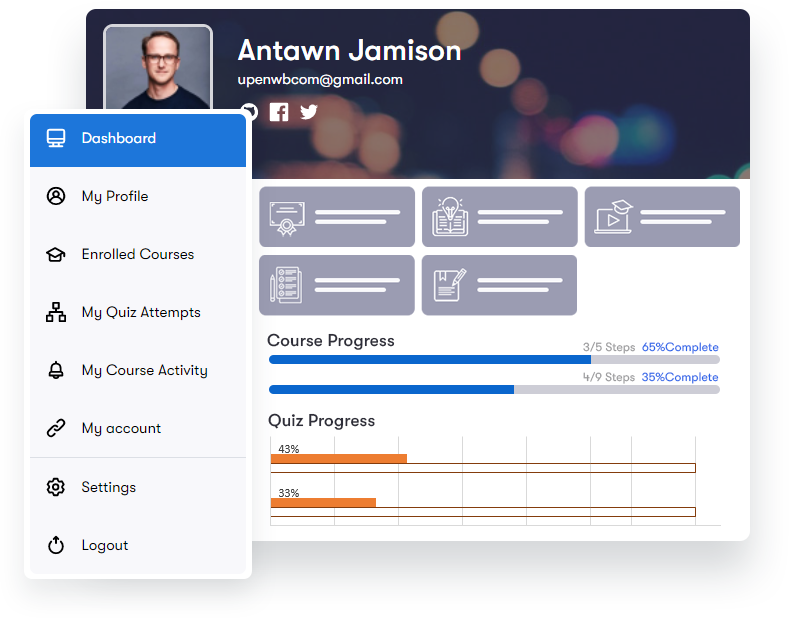
 View and Manage Student Profile With the profile management feature students can manage their profiles easily . This feature allows the students to fill their personal information line name, email, bio, git repository etc.
Become a instructor Students can also become the instructor in a single click. They will apply to be an instructor and can sell their courses if their request is approved by the admin. Course Announcements Admin can create course announcements to share the important information with the students, and students can view these announcements easily from the dashboard page.
Zoom Integration Learndash Dashboard now integrates with Zoom. Instructors can schedule one-on-one meetings with students, using their own Zoom account for API keys. Setting up Zoom meetings in the dashboard is easy – just sign in with your Zoom account. Buy Now 
 Multi-Instructor List You can display instructors' gird using shortcode [ld_dashboard_instructors_list col="3"] to any page, and you are good to go.
In addition, each instructor has a sharable URL, which will display the instructor's bio and courses. Public Instructor Profile Users can also get detailed information of instructors by clicking on the instructor. Invite Students To make your online course successful and stand out from competitors, you need to attract the right students. With Learndash Dashboard, you can invite ideal students by providing their email addresses.
As a site admin, instructor or group leader, you can ensure that you have the right people enrolled in your course, leading to better results and student satisfaction. Buy Now  Smart, Simple, and Scalable LMS solution 4.7/5 Users rate professionals 1000+ Help you configure easily Designed to Meet All of Your eLearning Requirements Create and Manage with ease whether you're a cook, artist, or an individual trainer,Learndash Dashboard allows you to develop and maintain your eLearning platform with no effort Informational data Insights Advanced data-driven analytics, reports, and visualizations to monitor courses and students' progress. Simple Pricing We are here to help!
We include extensive documentation to set up every aspect of our products, but if you need further assistance we’ll be right there with you on our fully monitored Support! Basic Lifetime Single License Perfect for new portals just starting out $99 $99/yr 1 Site License 1 Year of updates & support Email Support Buy Now 5 License Perfect for new portals just starting out $199 $199/yr 5 Site License 1 Year of updates & support Email Support Buy Now Developer License Perfect for building sites for clients $249 $249/yr Unlimited Licenses 1 Year of updates & support Email Support Buy Now Single License Perfect for new portals just starting out $249 $249 1 Site License Lifetime updates & support Email Support Buy Now 5 License Perfect for new portals just starting out $349 $349 5 Site License Lifetime updates & support Email Support Buy Now Developer License Perfect for building sites for clients $499 $499 Unlimited Licenses Lifetime updates & support Email Support Buy Now Check out our Refund policy and Support policy. All pricing is in USD.
You can change plans or cancel your account at any time. Read more about the Privacy Policy. Recommended by Leading Experts inthe eLearning Industry Certified LearnDash Experts LearnDash Customization Services Get Started Now Frequently Asked Questions What are the required plugins for LearnDash Dashboard? The LearnDash Dashboard plugin requires LearnDash LMS to be installed and activated on your site.
Additionally, it supports integration with Zoom for scheduling meetings. Can instructors create and manage courses from the frontend? Yes, the LearnDash Dashboard plugin provides a frontend course builder that allows instructors to create and manage courses, lessons, topics, quizzes, and certificates directly from the frontend without accessing the WordPress backend.
Is Zoom integration supported? Yes, LearnDash Dashboard integrates with Zoom, allowing instructors to schedule one-on-one meetings with students. Instructors can use their own Zoom account for API keys and manage meetings directly from the dashboard. Can I view detailed reports and analytics? Yes, the plugin provides detailed reports and analytics for course completion times, assignment and essay grades, quiz attempts, and more.
You can filter and export these reports in CSV format for further analysis. Can students track their progress? Yes, students have a dedicated dashboard to track their course progress, quiz attempts, and assignments. They can also manage their profiles and view course announcements. How can I manage the withdrawal of earned income for instructors? Instructors can request the withdrawal of their earned income through the dashboard.
Admins can approve or reject these requests, and all withdrawal request statuses will be visible on the admin dashboard. Supported withdrawal methods include bank transfer, e-check, and PayPal. How do I handle email and private messaging within the plugin? The plugin supports private messaging and email integration, allowing instructors and group leaders to communicate with students safely.
You can send individual or bulk emails and manage email logs through the dashboard. What if I need more features or have a question? If you require additional features or have any questions, please contact our support team. We continuously improve our plugins based on user feedback and are available to assist you with any issues or inquiries. Is there a trial version available for the plugin?
While we do not offer a trial version, we do provide a 30-day money-back guarantee. If you are not satisfied with the plugin, you can request a refund within 30 days of your purchase. https://wbcomdesigns.com/refund-policy/
Recent releases
Release history
- (#198) Error message on designs settings
- Uniform user name at all places on the course report
- Avg completion time
- Export file name in the student course report
- "Course Short Description" field for BuddyBoss theme
- BuddyBoss and reign theme course cover image option
- average competition column in the course report
- Managed: (#826) course cover uploading image UI and button
- class-ld-dashboard-time-tracking.php
View changelog
- Release Date 8th November 2022*
- a11y - The Relationship field is now fully accessible for keyboard navigation
- i18n - Select dropdown arrow is now aligned correctly in RTL languages
- i18n - Radio buttons are now aligned correctly in RTL languages
- JavaScript initialization performance while editing large field groups has been improved, especially in Safari
- Tooltips for field settings are now shown as inline instructions
- Saving a field group is now disabled until a field group title has been entered
- Additional sanitization across various internal parts of the plugin
- Dragging and dropping a field in no longer opens the field settings in Firefox
- Copying the field name or key to the clipboard now works as expected for new or reordered fields, and subfields
- Saving a field group will now temporarily disable the "Save Changes" button while saving
- Block templates that include html comments as the first DOM element no longer crash the block editor on edit
- Block templates that include InnerBlocks on the DOM’s first level no longer trigger JS warnings
- Block templates that render other blocks now correctly render their InnerBlocks
- Legacy block attribute values are no longer overwritten by blank defaults of new versions
- Paginated Repeater fields now work with non-paginated Repeaters as subfields
- Repeater pagination is now properly disabled while inside blocks
- REST API no longer causes a PHP warning if `$_SERVER['REQUEST_METHOD']` is not defined
- REST API now supports integer keys for the Select field
- REST API now supports passing `null` to Image and File fields
- Invalid ACF meta keys no longer cause a fatal error when retrieved with `get_fields()`
Frequently asked questions
Is Learndash Dashboard GPL licensed?
What is the latest version of Learndash Dashboard?
How much does Learndash Dashboard cost on GPLCoffee?
Which WordPress and PHP versions does Learndash Dashboard support?
Is Learndash Dashboard safe to download?
Auto-updates included
Install it once, update automatically.
The GPLC Connector installs this plugin from your wp-admin and rolls out new versions to your connected sites. Included with every membership plan: 10 to 40 connected sites depending on the plan (Lite 10, Pro 20, Geek and Lifetime 40).