
Frontend Reports For WooCommerce v1.0.14 - BerryPress
Frontend Reports for WooCommerce Add-On Plugin The Frontend Reports for WooCommerce add-on plugin helps businesses display WooCommerce sales reports directly within the frontend of their WordPress...
Related items
Related Woocommerce Plugins
WooCommerce Subscriptions - WordPress Plugin
by Prospress Inc
WooCommerce Subscriptions Plugin allows you to introduce a variety of subscriptions for physical or virtual products and services.
WooCommerce Smart Coupons - WordPress Plugin
by StoreApps
Enhance your coupon options - create gift certificates, store credit, coupons based on purchases and more.
WooCommerce Table Rate Shipping - WordPress Plugin
by WooCommerce
Advanced, flexible shipping. Define multiple shipping rates based on location, price, weight, shipping class or item count.
Frontend Reports for WooCommerce Add-On Plugin The Frontend Reports for WooCommerce add-on plugin helps businesses display WooCommerce sales reports directly within the frontend of their WordPress website. Shortcode Display Display dynamically updated reports in posts and pages using shortcodes, allowing users to view the reports without having admin access. Interactive Reports Displayed reports are paginated, sortable, and searchable for easy data exploration.
Download Links Generate links to dynamically updated downloadable reports in multiple formats. Widget Support Display reports using WordPress widgets in any widget area like sidebars. 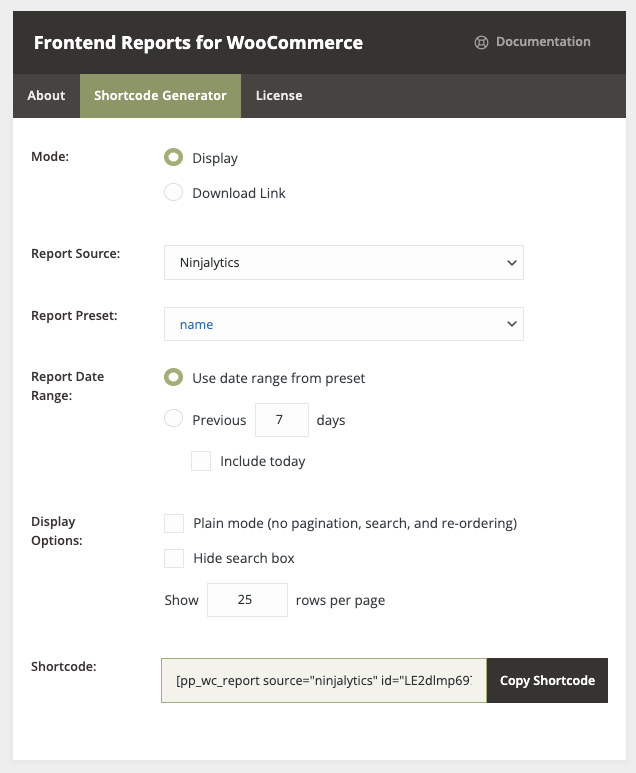 Display Reports on the Frontend As opposed to generating a report manually and emailing the report, the Frontend Reports for WooCommerce add-on plugin lets users present a report on the frontend of a website. This is an incredible tool for WooCommerce store managers and webmasters who would like to display sales-related data without any hassle or manual effort.
For example, when used in conjunction with a content restriction plugin, Frontend Reports for WooCommerce can be used to display sales reports to select logged in site visitors without granting access to the WordPress/WooCommerce admin area. In addition to providing an embedded interactive tabular display of the data with sorting and searching capabilities, the add-on can also be used to provide a download link so that frontend users can download a copy of the report in the format specified in the reporting plugin's settings. 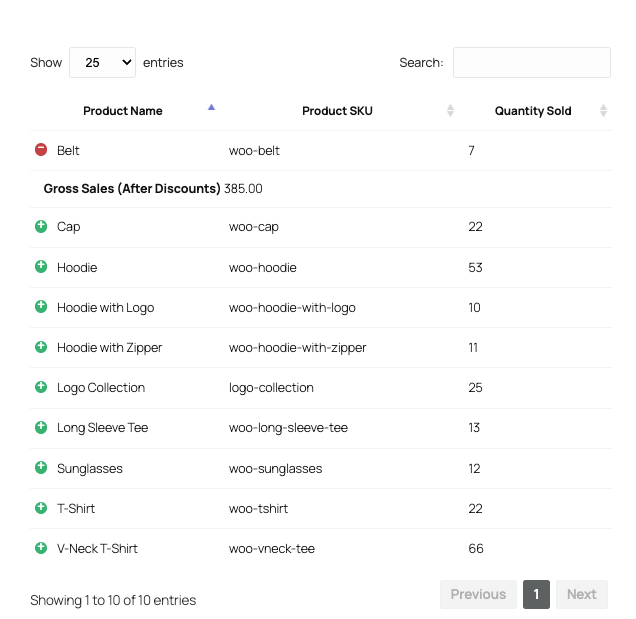 Easy Shortcode Generator After installation and activation, the Frontend Reports for WooCommerce add-on plugin will add a menu item to the WooCommerce menu in the WordPress dashboard. The Frontend Reports for WooCommerce add-on plugin can be used to add an embedded report display or download link to a page, post, or other shortcode-compatible content through the use of a WordPress shortcode or widget.
Show full descriptionShow less
Once the user sets the parameters for the embedded report or report download link in the Frontend Reports shortcode generator (available in the WordPress admin under WooCommerce > Frontend Reports), they'll be presented with the corresponding WordPress shortcode. This shortcode can then be copied and pasted into a page, post, or other shortcode-compatible content, where the report or download link will be displayed once the content is saved and published. Once the user sets the parameters for the embedded report or report download link in the Frontend Reports shortcode generator (available in the WordPress admin under WooCommerce > Frontend Reports), they'll be presented with the corresponding WordPress shortcode.
This shortcode can then be copied and pasted into a page, post, or other shortcode-compatible content, where the report or download link will be displayed once the content is saved and published. 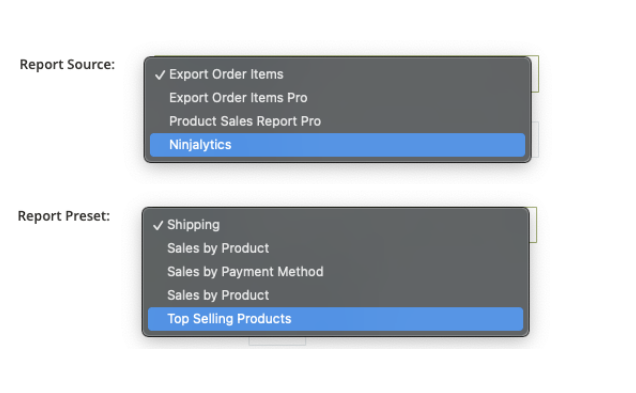 Backend Preview The Frontend Reports for WooCommerce add-on plugin includes a shortcode generator in the WordPress admin, featuring a single page display with all of the shortcode settings. Here the user can set the report variables extremely easily. First, the user can decide whether they'd like to display the report itself embedded in the content where the shortcode is inserted, or a download link for the report.
Next, they can select which one of the compatible plugins (Product Sales Report Pro, Export Order Items Pro, or Ninjalytics, if installed and activated) they're like to pull the report from, along with the report settings preset to use (if presets are supported by and defined in the selected reporting plugin). 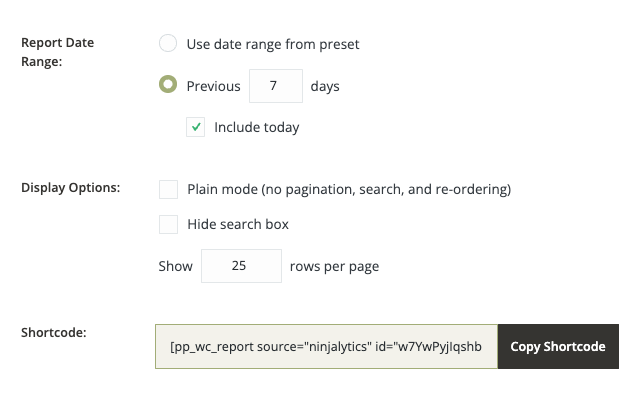 Flexible Date Range Options Users can also set the date range for the report by choosing to use either the date range defined in the source reporting plugin or a custom date range expressed as a number of days prior to the current day (optionally including the current day). If choosing to display the report via the WordPress shortcode rather than only a download link, the user can set a number of display options for the report, such as whether or not interactivity (pagination, search, and sorting) is enabled for the report display. Once all of the options have been defined, the user can simply copy the WordPress shortcode and paste it into a page, post, or other shortcode-compatible content to display the report or download link within that content in the frontend of their website.
 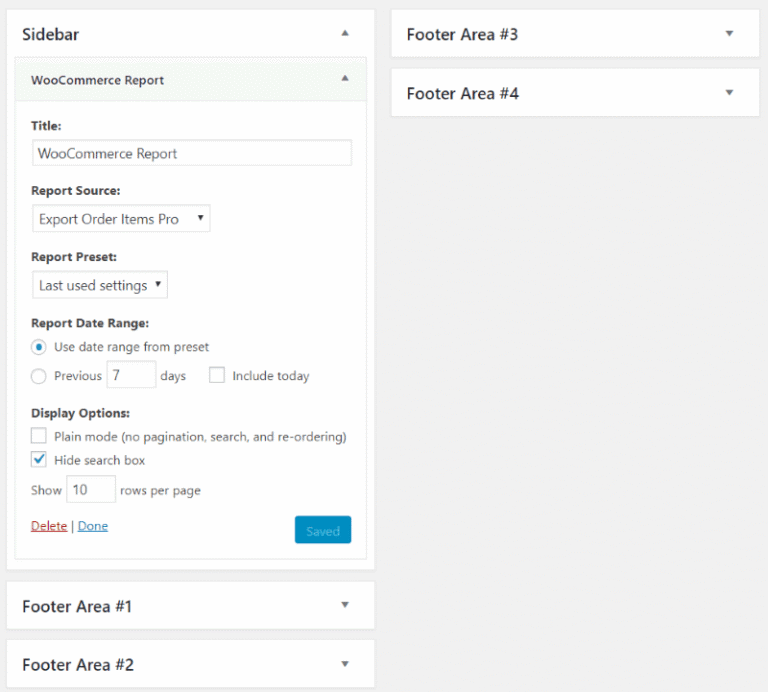 WordPress Widget Support As an alternative to the shortcode-based method of inserting a report into the frontend, reports can also be displayed in a WordPress widget which can be inserted into a widget area on the Appearance > Widgets admin page.
Once the widget has been inserted, it can be configured with similar parameters as the shortcode generator in report display mode. Works With Compatible Reporting Plugins Frontend Reports for WooCommerce is not a standalone plugin, but an add-on extension that works in conjunction with compatible WooCommerce reporting plugins:  Export Order Items Pro Export order details for use in order fulfillment and data analysis.
  Ninjalytics Next-generation reporting with charts, calculated fields, and advanced analytics.
  Scheduled Email Reports Email your reports as an attachment on a recurring schedule.
  Extra Product Options Addon Addon for WooCommerce Extra Product Options plugin.
Recent releases
Release history
Frequently asked questions
Is Frontend Reports for WooCommerce GPL licensed?
What is the latest version of Frontend Reports for WooCommerce?
How much does Frontend Reports for WooCommerce cost on GPLCoffee?
Is Frontend Reports for WooCommerce safe to download?
Auto-updates included
Install it once, update automatically.
The GPLC Connector installs this plugin from your wp-admin and rolls out new versions to your connected sites. Included with every membership plan: 10 to 40 connected sites depending on the plan (Lite 10, Pro 20, Geek and Lifetime 40).