
Formidable Coupons Addon v1.1 - WordPress Plugin
Ever needed a way to add promotional pricing to your WordPress payment forms without duplicating forms or writing custom code?
Same brand
More from Formidable Forms
Formidable Forms Pro - WordPress Form Builder
by Strategy11
Customizable You have complete control over what your views look like and how they behave with Formidable Forms Pro Sortable Easily display your form entries, then sort them or make them searchable.
Formidable Forms Advanced Custom Fields Addon
by Strategy11
Want ACF forms on the front-end of your WordPress site?
Formidable Forms PDF Addon
by Strategy11
If you’ve been looking for a form to PDF WordPress plugin, look no further.
Related items
Related Forms Plugins
Gravity Forms - The Best WordPress Form Plugin
by Rocketgenius
The Easiest Tool to Create Advanced Forms for Your WordPress Powered Website.
WPForms Pro - The World's Best Drag & Drop WordPress Form Builder
by WPForms
WPForms is the best WordPress contact form plugin.
Fluent Form Pro Addon - Fastest & Most Powerful WordPress Form Plugin
by WPManageNinja
WP Fluent Forms Pro addon is the premium addon to fastest and most intuitive plugin for WordPress form building.
Ever needed a way to add promotional pricing to your WordPress payment forms without duplicating forms or writing custom code? That's exactly what Formidable's Coupon feature is here to do. No more managing discount codes in spreadsheets or manually tracking usage. This feature helps you create a complete promotional pricing system for your WordPress forms.
This tool is for anyone running product sales, event registrations, or membership sites that need flexible discount code management.  Top features Percentage and fixed amount discounts Automatic expiration scheduling Usage limits (total and per-user) Real-time usage tracking Form-specific code assignment Instant total updates (no page refresh) WooCommerce integration Create and manage discount codes the easy way Formidable's Coupon feature is as simple as creating a code and assigning it to your forms. Navigate to Formidable → Payments → Coupons.
  Click Add New, and then configure your discount. Set the code, choose percentage or fixed amount, add expiration dates, set usage limits, and assign it to specific forms.
 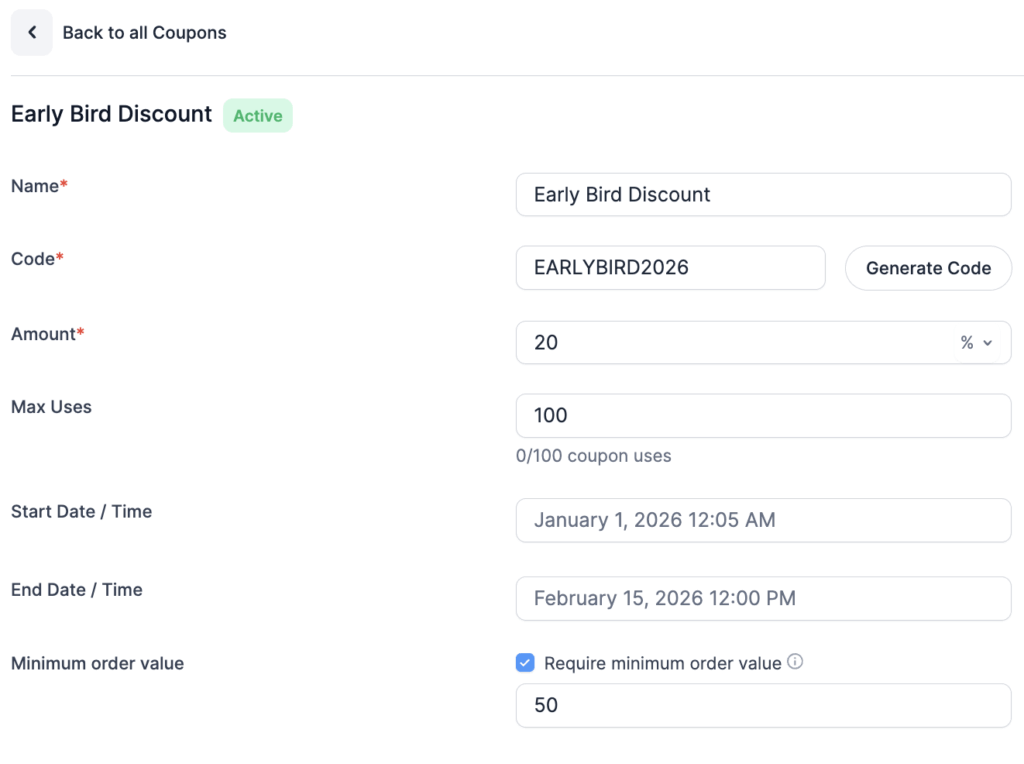 But what types of forms would you use this for?
We can think of a few: Product sales and digital downloads Event registration with early bird pricing Affiliate tracking programs Member-only discounts Limited-time holiday promotions Private customer pricing You'd be amazed how simply adding discount codes increases conversions and makes promotional campaigns easier to manage. Set expiration dates that work automatically Sometimes, you only want discount codes to work during specific promotional windows. You can schedule start and end dates to make that happen.
Whether it's a Black Friday sale or a month-long early bird promotion, codes activate and expire automatically—no manual intervention required. Your flash sale ends at midnight? The code stops working at exactly 12:00 AM. You don't have to remember to disable anything. Control usage limits and track performance in real-time Set maximum usage limits when creating your codes—perfect for "first 50 customers" promotions or preventing unlimited code sharing.
Show full descriptionShow less
The Coupons List page displays real-time stats for each code: Total times used Remaining uses before limit Expiration date Assigned forms Codes automatically stop working when they hit their usage limit or expiration date. Want to learn more about setting up and managing discount codes? Check out our complete guide to adding discount codes to WordPress forms.
Note: The Coupon feature is available in Formidable's Business Plan or above. Pre-apply codes with URL parameters Need to track which marketing channel is driving conversions? Set your Coupon field's default value to [get param=coupon], then share links like yoursite.com/form/?coupon=SAVE20. The discount applies automatically when someone clicks your link.
This is perfect for: Email campaigns with unique codes per segment Affiliate links that auto-apply their commission code Social media promotions with platform-specific tracking Partner referral programs Different channels get different codes. You see exactly which marketing efforts are working. Works seamlessly with WooCommerce Sometimes, your products need complex configuration before checkout.
Formidable handles that perfectly. Users configure their custom product through your form (with conditional logic, calculations, and file uploads), apply a discount code, then check out through WooCommerce. Use Formidable for complex product input. Use WooCommerce for payment processing. They work great together. This approach is ideal for: Custom furniture with multiple configuration options Made-to-order products with dynamic pricing Service quotes that depend on user selections Build-your-own product bundles The coupon applies to your Formidable-calculated price before it reaches WooCommerce checkout.
Try Formidable Forms!
Recent releases
Release history
Frequently asked questions
Is Formidable Coupons Addon GPL licensed?
What is the latest version of Formidable Coupons Addon?
How much does Formidable Coupons Addon cost on GPLCoffee?
Is Formidable Coupons Addon safe to download?
Auto-updates included
Install it once, update automatically.
The GPLC Connector installs this plugin from your wp-admin and rolls out new versions to your connected sites. Included with every membership plan: 10 to 40 connected sites depending on the plan (Lite 10, Pro 20, Geek and Lifetime 40).