
BookingPress Telegram Notification Addon v1.1
Telegram Notification Telegram Notification Integration: To get and Activate the Telegram Notification Addon, please follow the below steps.
Same brand
More from BookingPress
BookingPress Pro - WordPress Plugin
by Ankur Chotai
BookingPress Pro is a full-fledged appointment booking plugin that allows setting up a complete booking system according to your requirements on your WordPress website with super ease.
BookingPress Location Addon - WordPress Plugin
by Ankur Chotai
The Location Addon offered by the BookingPress plugin is an essential tool for service-based businesses such as spas and salons with multiple locations.
BookingPress Cart Addon - WordPress Plugin
by Ankur Chotai
With BookingPress, you will also be able for your customers to select multiple services at a time via Cart Addon.
Related items
Related Booking Plugins
Bookly Pro - #1 WordPress Appointment Booking Plugin
by BOOKING TECHNOLOGIES
Automated online booking & scheduling for WordPress: fully customizable booking form with online payments, notifications, and Google Calendar sync.
Eventin Pro - WooCommerce Events & Ticket Plugin
by themefunction
WP Eventin is a simple and easy to use WooCommerce Event Manager Plugin to manage Event, Calendar, Conference and Sell Tickets.
Fluent Booking Pro - Ultimate WordPress Scheduling Solution
by WPManageNinja
FluentBooking is the ultimate solution for booking appointments, meetings, webinars, events, sales calls, and more.
Telegram Notification Telegram Notification Integration: To get and Activate the Telegram Notification Addon, please follow the below steps. First, login to the BookingPress Website, and you will be redirected to the My Account page. Now, click on the “Access Passes” link from the left menu panel. After going to the Access Passes, click on the “View your downloads” button.
From the list, please look for the “Telegram Notification” add-on, click on the download button, and it will automatically start downloading the addon. After the download is finished, upload the downloaded zip file to WordPress, just link any other WordPress Plugin, then install and activate the addon to use it.  The Telegram Notification Addon for BookingPress allows you to send appointment notifications directly to your customers via Telegram. It helps improve communication and ensures your clients never miss an update.
Setting up Telegram Notification in BookingPress Once the Telegram Addon is activated, navigate to:BookingPress > Settings > Notifications, and locate the Telegram Settings section. Please fill in the following details: API ID and API Hash – Retrieve these from your Telegram account. If you haven’t created them yet, refer to the Obtaining API Credentials section below.
Select Username Field – You need a custom field to collect the customer’s Telegram username. If you haven’t set this up, please refer to the Customizing Custom Fields Documentation. Phone Number – Enter the number associated with your Telegram account. After entering the phone number: Click Get OTP – Telegram will send a One-Time Password (OTP) to that number.
Show full descriptionShow less
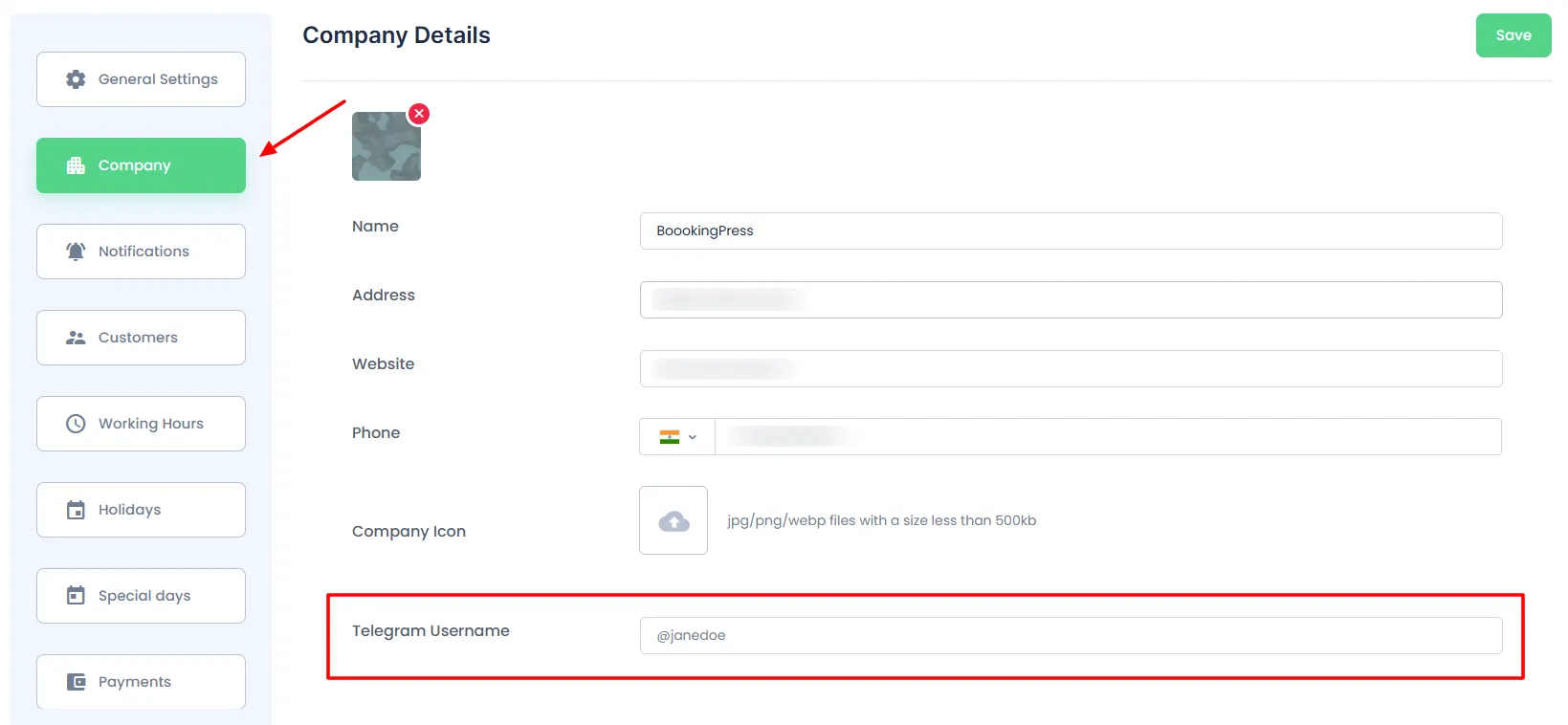
Enter the OTP in the field below and click Verify. 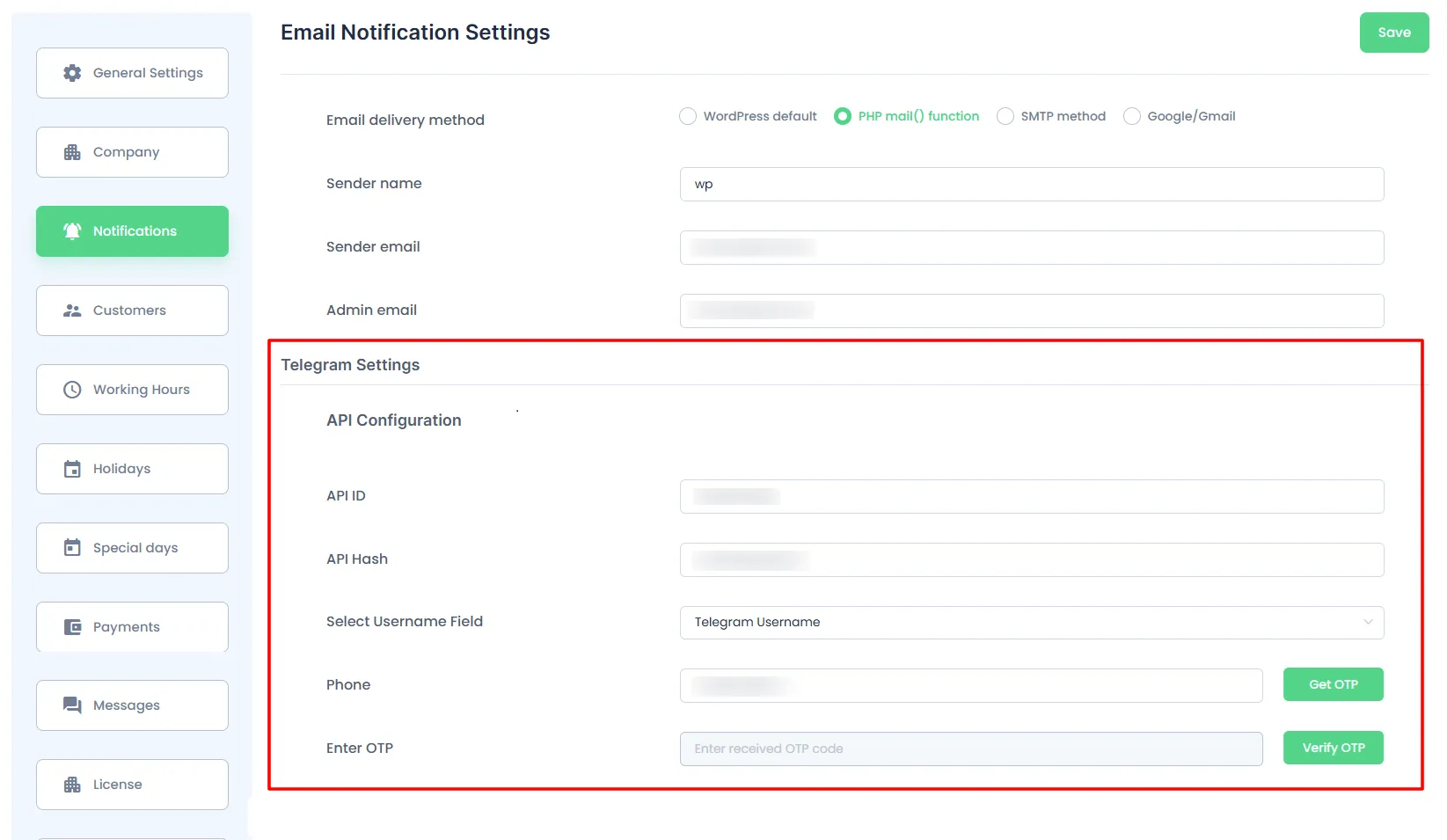 To make sure the telegram notifications are received to the Admin you can enter the telegram user in BookingPress > Settings > Company.
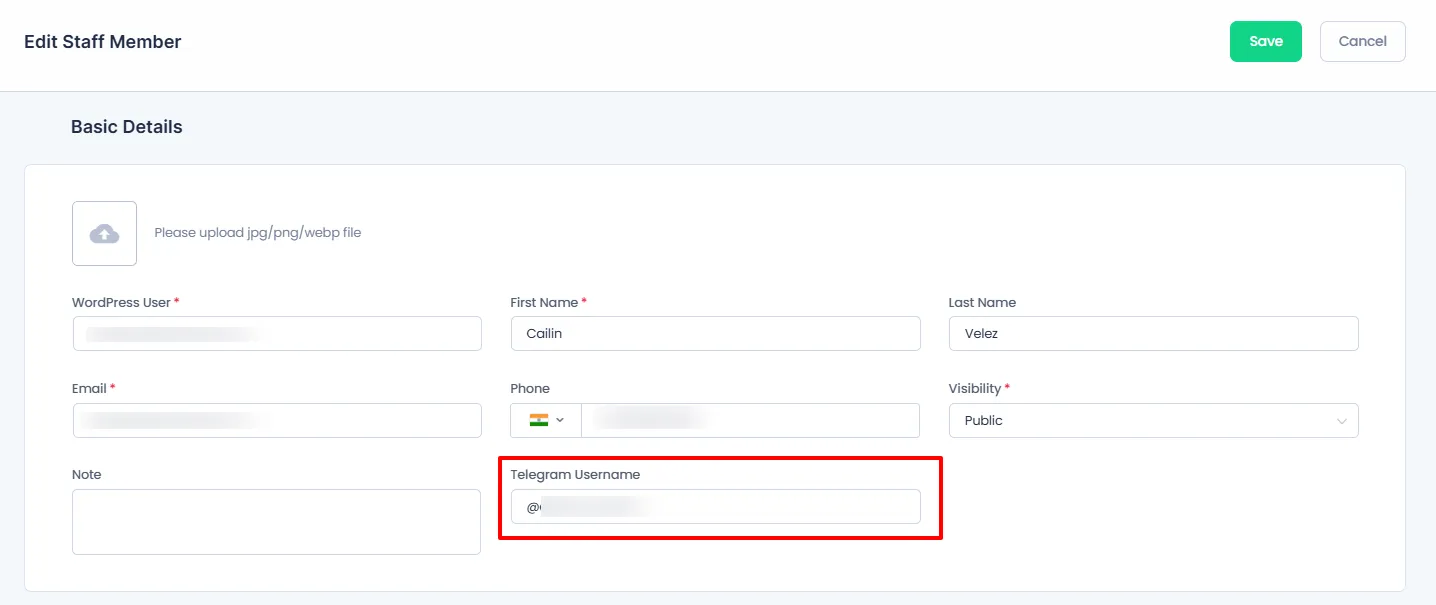
  If you have the Staff Member module enabled then you will have to enter the Staff Members telegram username, which can be done by heading over to BookingPress > Staff Members, here edit the staff member and enter their Telegram Username in the field. The Staff Member will also be able to alter the Telegram username from their Staff Dashboard.
  Obtaining Telegram API Credentials To use the Telegram API, follow these steps: Sign up for Telegram using the official app. Visit: https://my.telegram.org Log in and go to API Development Tools.
Fill out the required form. You will receive your API ID and API Hash. Add these credentials in BookingPress > Settings > Notifications > Telegram Settings Note: Each phone number can only be linked to one API ID. 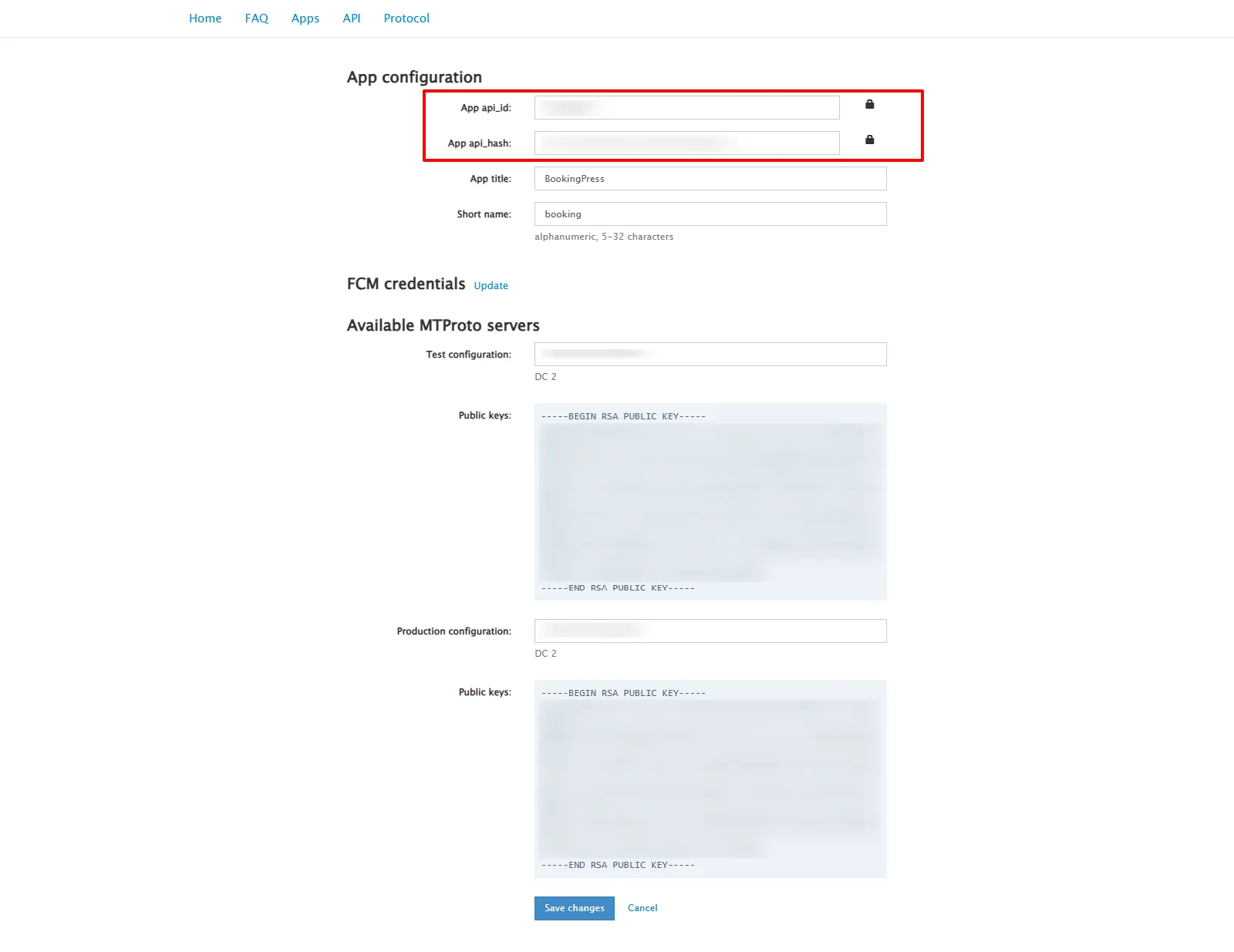 Configuring Telegram Notification Templates To customize the Telegram messages: Go to BookingPress > Notifications. Select the notification (e.g., Booking Confirmed, Appointment Reminder, etc.).
Scroll down and enable Send Telegram Notification. Enter your custom message in the Telegram Notification Message box. You can use the email placeholders listed on the right to insert booking details into the message. 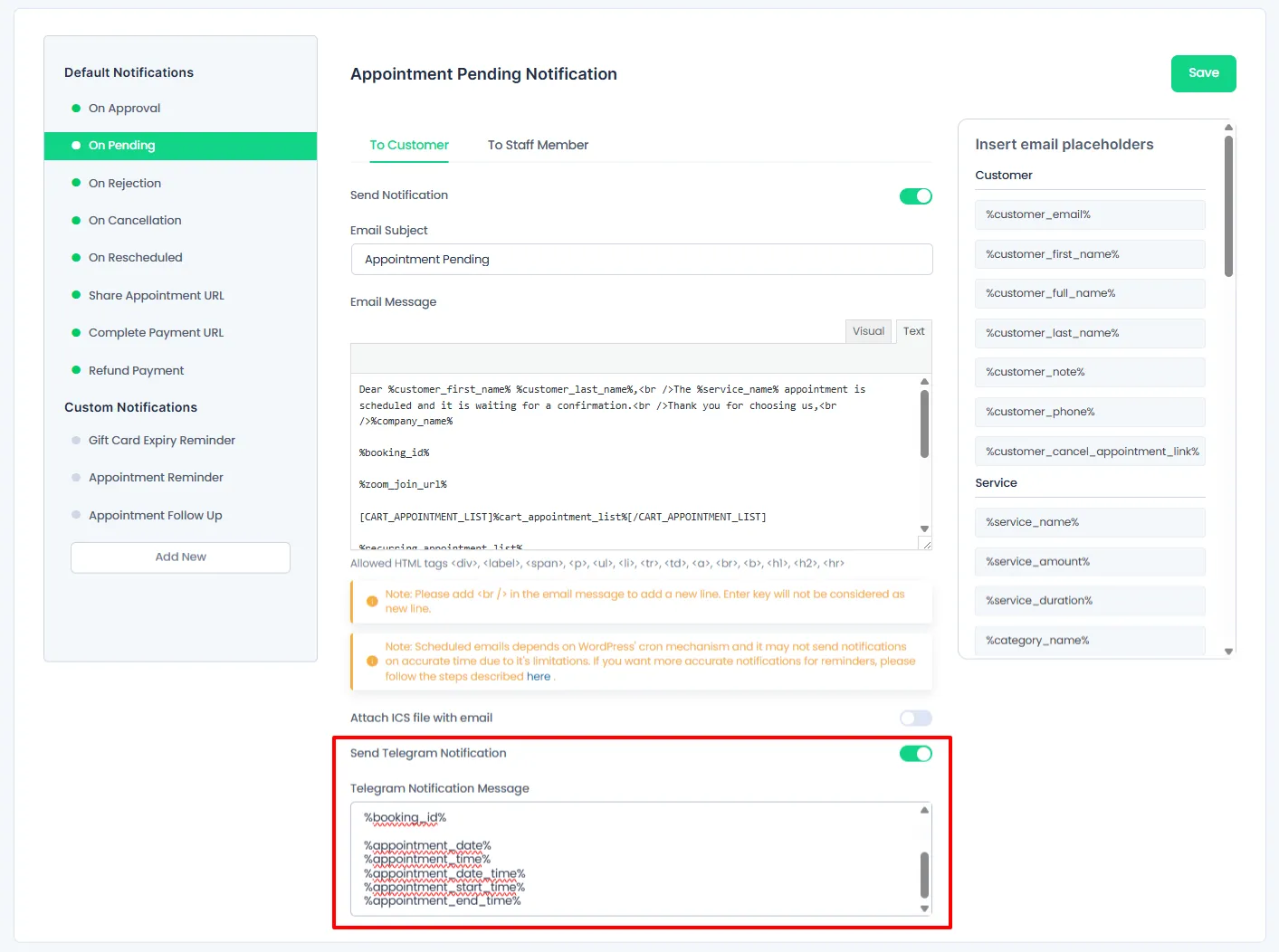
Recent releases
Release history
Frequently asked questions
Is BookingPress Telegram Notification Addon GPL licensed?
What is the latest version of BookingPress Telegram Notification Addon?
How much does BookingPress Telegram Notification Addon cost on GPLCoffee?
Which WordPress and PHP versions does BookingPress Telegram Notification Addon support?
Is BookingPress Telegram Notification Addon safe to download?
Auto-updates included
Install it once, update automatically.
The GPLC Connector installs this plugin from your wp-admin and rolls out new versions to your connected sites. Included with every membership plan: 10 to 40 connected sites depending on the plan (Lite 10, Pro 20, Geek and Lifetime 40).